




Disable Thawte PCA (2036) root
The recommendations listed on this page are not up to date. This root is a SHA1 compatibility root used by Thawte. Disabling it to use a cross-signed equivalent would cause certificate chain issues.
Some Microsoft products (IIS servers for instance) include the "Thawte Primary Root CA" root that will expire on 2036 and that interferes with Thawte server and Code Signing certificates.
Nota : For code signing certificates, the intermediate version is used in java 1.4 and on some versions of java 6. All versions of java released later presents the Thawte Primary Root CA root that will expire on 2036-07-17. Do not deactivate that root and do not install the intermediate (it won't be used).
The issue triggers a failure on tests realized by CO-PiBot (Test a X509 / SSL server certificate online) even though the certification chain has been correctly installed. Instead of using the "Thawte Primary Root CA (2020)" intermediate, the server presents the "Thawte Primary Root CA (2036)" root.
To troubleshoot, deactivate the problematic root and disable the automatic update of certification authorities (see
Disable certification authorities' update under Windows 2003 and 2008).
Disable thawte Primary Root CA (2036)
1- Launch the MMC
- Click Start then select Run and type mmc
- Click on the File menu and select Add/Remove Snap in
- Choose Add, select Certificates among the list of Standalone Snap-in and click Add
- Choose Computer Account and click Next
- Choose Local Computer and click Finish
- Close the window and click OK on the previous window
2- Locate the certificate to disable
- Deploy the hierarchy to go to Trusted Root Certification Authorities then Certificates
- Among the list, spot the certificate
	Common Name - thawte Primary Root CA
	Expiry Date - 17th July 2036
	Thumbprint - 91 c6 d6 ee 3e 8a c8 63 84 e5 48 c2 99 29 5c 75 6c 81 7b 81
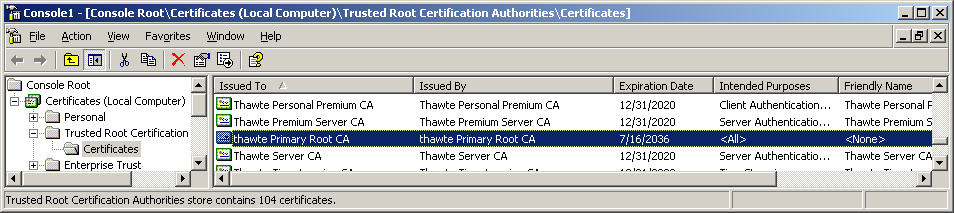
- To disable the certificate, right-click on it and select properties
- In the Certificate purposesarea, tick Disable all purposes for this certificate
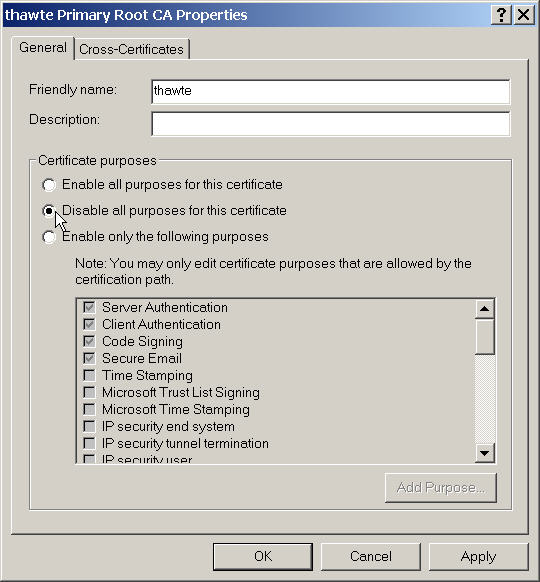
- Click OK. You can now stop the MMC.
3- Reboot the server
Under IIS6, stop and start the website can be enough, but generally the machine needs to be restart. Firstly stop and start the website then test your certificate with CO-piBot ( Test a server certificate online), if it does not work, reboot the machine.If it still does not work, go back to the second step and disable Thawte 2036 root and reboot the machine.